Deadlink Labs / Products
Cassette Mixtapes
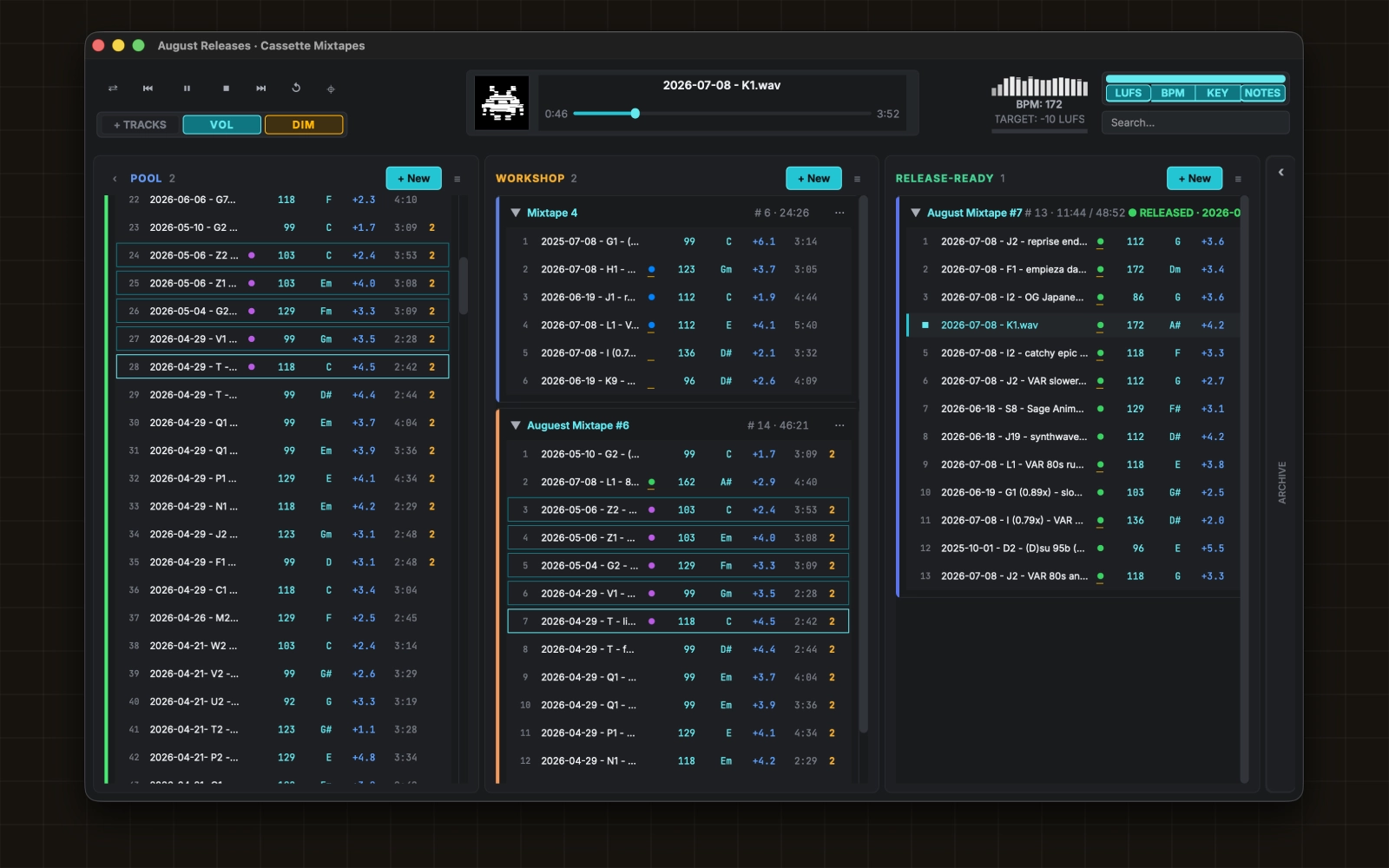
Finish a release on your own laptop and know it is right before you upload it. Cassette Mixtapes measures every track's loudness and true peak against the real target of the platform you are actually shipping to, and the numbers you see are the same numbers your distributor is going to see.
That last part is checkable, which is the whole point. The meter agrees with ffmpeg's ebur128 within 0.05 LU across seven real masters, and with DaVinci Resolve within 0.1 LU across a full 14-track release. Both comparisons are printed below.
macOS only. It is in private beta with a small group right now, free while it is in beta, and testers get a steep discount when it goes paid. Request access below and tell me what you make.
Request beta access
Testing with a small group right now. Tell me a bit about what you make and I'll get back to you.
Sent
Your request is in my inbox, and I usually get back within a day or two.
A short confirmation is on its way to the address you gave.
You finish a mix at 1am, export it, and send it out into the world. Four days later someone tells you it sounds quieter than the track before it, or that the last chorus is clipping on their phone. It’s live. You can’t fix it.
Or: you spend an afternoon generating tracks and wake up to fifty files called
track_047.wav, with no memory of which three were any good.
I’ve lived both of those more times than I want to admit. So I built the tool I wanted.
Your loudness meter might be lying to you. Mine was.
Most tools that hand you a LUFS figure fold your stereo master down to mono before they measure it.
BS.1770, the standard every platform uses, sums the energy of the left and right channels. Fold them together first and you halve that sum. On an ordinary center-heavy mix that reads exactly 3.01 LU too quiet. On a wide one, up to 6.
Six. That’s the entire width of the window you were aiming for.
You’d never catch it either, because the number that comes back looks completely reasonable. It’s just wrong.
I know because this app got it wrong too. For its entire life the feature labeled “true peak” was reporting ordinary sample peak. The code asked its audio library for a high-quality resampler that needs a package this project has never shipped. The request failed. An error handler swallowed the failure without a word, and the code fell back to the one measurement that cannot catch what true peak exists to catch. On a test signal that is the difference between -0.09 dB and +1.22 dBTP. Between ship it and rejected.
TAKEAWAY: a silently wrong number is worse than a crash, because you act on it. That’s a rule in the codebase now. Measurements are honest or they’re absent. There is no plausible stand-in.
While we’re on trust: nothing leaves your machine. No account, no cloud, no upload, no network call at all. That isn’t a privacy policy you have to take my word on, it’s an architectural rule the app is built around. Your unreleased masters stay on your laptop.
It found two errors in my own finished masters
Once the meter was fixed I re-measured my back catalog. Two tracks I had on record at -17.29 and -17.80 LUFS were actually sitting at -13.65 and -14.23.
They had been on the Spotify target the whole time. If I’d trusted the old reading and normalized them, I’d have shipped them 3.5 dB past the target, and paid for it in limiting I never needed.
That’s why the receipts below exist.
The receipts
Seven real masters, measured by Cassette Mixtapes and by ffmpeg’s ebur128,
which is the reference nobody argues with.
| Master | Cassette Mixtapes | ffmpeg ebur128 |
|---|---|---|
| F1 - empieza dark y se pone linda | -13.39 | -13.4 |
| H1 - barroquewave | -13.65 | -13.6 |
| I (0.79x) - 80s hair power ballad | -12.06 | -12.0 |
| I (0.79x) - VAR 80s synthpop glam ballad | -12.00 | -12.0 |
| I2 - OG Japanese Anime VHS end credits | -13.59 | -13.6 |
| I2 - catchy epic synthwave power bass | -13.33 | -13.3 |
| K1 | -14.23 | -14.2 |
Agreement within 0.05 LU on every single file. Not close. The same number.
Third opinion: a full 14-track release measured in DaVinci Resolve agreed within 0.1 LU, and true peak within 0.01 dB.
You don’t have to take any of this on faith. ffmpeg is free, Resolve has a free version, and every number here came out of a command that ships with the app.
Too loud buys you nothing
Every major platform normalizes playback. Spotify, Apple Music, YouTube, Tidal, Amazon, Deezer, SoundCloud. They measure your track and turn it up or down to land on their own number.
So if you mastered hot to compete, here’s what you actually bought: the platform turns you down anyway, and you’re left holding a smaller, more fatiguing master and none of the loudness. You paid the price and got none of the benefit.
Too quiet has its own tax. The platform turns you up, which lifts your noise floor and flattens whatever dynamics you had left.
Pick your destination and the whole board recolors around that platform’s real target. -14 for Spotify, -16 for Apple Music, -15 for Deezer, and a more conservative -2 dBTP ceiling for Amazon. One choice drives both the readiness checks and the export, so there’s no way for the check and the render to disagree.
Bandcamp is the exception and it gets two presets, because Bandcamp doesn’t normalize. A louder master genuinely is louder there. Bandcamp Loud sits at -10, and it used to sit at -9. Here’s why it moved, measured on a commercially mastered synthwave track:
| Target | Gain needed | Limiting |
|---|---|---|
| -9 LUFS | +3.1 dB | ~3.5 dB |
| -10 LUFS | +1.3 dB | ~1.7 dB |
One LU nobody can pick out in isolation, for half the transient damage. A preset that forces multiple dB of limiting onto ordinary finished masters is miscalibrated, and -9 did exactly that across an entire album.
TAKEAWAY: the closer your master already sits to the target, the less anything has to do to it. Mastering to your target beats normalizing to it.
Normalize that checks its own work
Tick normalize in most tools and they calculate a gain change and hope.
This one renders the file, measures the file it just made, and re-renders from your original at a corrected gain if it missed. Four masters I tested landed at exactly -14.00 LUFS, deviation 0.00, true peak under the ceiling the whole way. When it still can’t get there it names the tracks and says by how much, instead of shipping them looking fine.
That behavior exists because of a bug report. Someone exported an album with the Bandcamp Loud preset and measured the renders in Resolve: -9.5 to -11.2 LUFS. Nothing hit the target. Worse, every track’s manifest claimed a gain of 1.9 dB and true-peak limiting it had never applied. The delivery record was fiction.
For a tool whose entire job is telling you a release is ready, reporting work it did not do is the worst failure available to it. So the loop closes on the actual file now, and the manifest reports what happened rather than what was intended.
I made 200 tracks. Now what.
Generating is the fun part. The folder afterward is not.
You’ve got Run_v1, Run_v2, Rerun, a bounce called 03.wav whose tags say
Runaway, and a whole Runaway EP. Nothing in there tells you the keeper from the
throwaway.
Drop the entire folder on the board and it sorts itself out. Subfolders included, tracks in embedded track-number order so track 10 lands after track 9, grouped into cards by album where the tags say so. Every track is analyzed the second it lands: BPM, key, loudness, true peak, about 1.6 seconds for a five-minute stereo file, on a background thread. You never wait for it and you never ask for it.
Then type in the search box and the whole board filters live. Every card shows
only its matching tracks with a 3 of 12 badge in the header. You see all six
takes of Run at once, side by side with their BPM and their LUFS, and you drag
the good one straight into the mixtape you’re building.
That’s the difference between a search that answers “where is it” and one that answers “which one do I want”. You’re comparing candidates, not looking up a fact.
It filters by more than a name: bpm:120-130, key:f#, lufs:>-10, flag:red,
quoted phrases, minus signs to exclude. On its own, lufs:>-10 is a readiness
sweep of the entire board.
And a track lives once. Put it on three releases and you get three references to one recording, so the analysis and the metadata stay in sync everywhere at once and you’re not duplicating four minutes of audio on disk for nothing.
It can’t eat your work
Exactly one code path in this app writes audio bytes, and it only ever writes new copies into an export folder you picked. No path deletes an audio file, ever. Remove the last reference to a track and it lands in a Trash card you can drag it back out of.
Your session gets 24 rolling backups written beside it. Pro Tools keeps 10, so that’s about two hours of walkback instead of fifty minutes.
That number is specific because it was earned. There was a version where a session file the app couldn’t parse, for any reason at all, a half-copied cloud sync or a disk hiccup, got a polite warning and then, thirty seconds later, an empty board written cleanly over it. A week of work destroyed by the autosave. Now a session it can’t read is quarantined under a new name and never overwritten, and you’re offered the most recent backup on the spot.
The session file itself is plain readable JSON. If this app disappeared tomorrow you could open it in a text editor and read out every playlist you ever built.
What it won’t do
It measures. It doesn’t fix. This is release prep, not mastering, and it will not rescue a bad mix. It puts your master at the right level and keeps its peaks legal, and that’s the whole job.
macOS only, because the flag colors are real Finder tags and I haven’t built the rest.
And it’s still rough. There are menus in the wrong place and edges that need sanding.
The deal
Free while it’s in beta, and a steep discount when it goes paid. What I want back is bug reports and an honest description of how you actually work, because the whole thing grew out of one person’s workflow and one workflow isn’t enough.
Request access up top and tell me what you make.